


Paycom
4.627.98K Reviews
App Specs
- Version
- 8.0.8
- Updated On
- License
- Free
- Downloads
- 5,000,000+
- Developer
- Paycom Software, Inc.
- Categories
- Tools
- Platform
- Android, iOS
Screenshots
 Analysis by AppCompare
I found Paycom most useful when I stopped thinking of it as a general finance app and treated it as a private work-information tool. It is built for managing payroll and human-resources details, and that distinction matters in a household where several people may share a phone or tablet. I can imagine one person checking a pay statement before leaving for work, while another family member uses the same device for entirely different tasks. The app can fit that situation, but it should not be treated like a shared family dashboard.
Paycom is a free Tools app from Paycom Software, Inc. Its purpose is practical rather than entertaining: it brings work-related information into a mobile setting so I do not have to rely on paper documents or remember to check a desktop browser. The current version is 8.0.8, and the app is intended for Everyone. That age label describes the app’s general content classification, not whether every child should be given access to an adult’s employment information.
Using Paycom in a shared household
A realistic household example is simple. I finish a shift, open the app, and want to review payroll information while sitting in the living room. Someone else may need the phone immediately afterward. In that moment, the important question is not whether the app can be installed on a shared device; it is whether I can keep my employment details within my own account boundary. My answer is to use Paycom as an individual account, even when the hardware is shared.
That approach changes how I recommend it. I would not create one casual household login for everyone, and I would not leave the app open while passing the phone around. Payroll and HR information is personal by nature. A shared device can be convenient, but convenience should not turn private work records into something visible to every person nearby.
The app makes the most sense for employees whose organization uses Paycom and expects them to access their own information digitally. It is less useful for a family member who simply wants to help with budgeting, because the app is not a household budgeting workspace. I would use it to inspect or manage my own employment information, then close it before handing over the device.
One practical habit is to separate coordination from disclosure. I might tell a partner that I have checked a payroll detail or that I need to review a work item, without showing the entire screen. That small boundary is especially valuable when children use the same phone. They may be old enough to operate the device, but that does not make an employee account suitable for unsupervised browsing.
What the first setup tells me
The initial experience is shaped by the employer relationship rather than by a standalone sign-up journey. Paycom is not the kind of app I install and immediately use as an independent calculator or note-taking tool. Its value depends on having the appropriate workplace access. If I am considering it for someone else, I would first ask whether that person’s employer uses Paycom and whether they have the credentials or enrollment details needed to enter the account.
Worth Reading Before You Choose

EA SPORTS FC Mobile 26 Is a Bigger Football Game, but It Takes Time

Flipboard Shows What News Apps Must Do Beyond the Feed

Switching to Android Auto Means Rethinking Your Driving Routine

Google Calendar Makes a Crowded Week Easier to Manage

Ludo King Makes the Most of the Minutes Between Plans

Baby Panda World Brings Quick Play to Modern Phones, but Its Game Library Feels Busy
That is an important setup boundary. Installing the app alone does not create a useful payroll record. It also means the app is not a replacement for an employer’s human-resources department. If a work detail looks wrong, the app may help me see the information, but resolving the underlying issue can still require communication with the employer.
On a shared device, I would complete setup only when I have privacy. I would avoid saving login information in a way that lets another person open the account casually, and I would make sure the device itself is protected before using a payroll tool. I am not presenting those as special Paycom controls; they are sensible boundaries around any app containing employment information.
The same principle applies when a household has two people who both use Paycom through their own workplaces. I would keep their accounts separate rather than trying to coordinate through one profile. Separate access reduces the chance of mixing up pay information, HR notices, or personal details. It also makes it clearer who is responsible for responding to a work-related item.
There is a trade-off here. A person who wants instant access on a family tablet may find the privacy discipline inconvenient. I think that inconvenience is justified. A payroll app should not behave like a shared shopping list, and the extra step of signing in only when needed is preferable to exposing information simply because the device happens to be nearby.
Turning payroll checks into useful household coordination
Paycom can support household planning indirectly. After I review my own payroll information, I can use the result to plan a bill, confirm that a work change has appeared, or tell someone at home that I need to follow up with my employer. The useful workflow is to check the source first, then coordinate in a separate conversation or budgeting tool. That keeps Paycom focused on employment records instead of forcing it to become something it is not.
For example, if I am expecting a change connected to work, I would open the app privately, inspect the relevant information, and make a note of the next action. If the information needs clarification, I would contact the appropriate workplace channel rather than asking a family member to interpret the screen. This avoids a common mistake: treating a visible number as self-explanatory when payroll details may require context.
Another helpful habit is to use the app as a verification point before making a household decision. I would not rely on memory when discussing pay-related timing with a partner. I would check the current information, explain only what is necessary, and keep the account itself private. This is a small but meaningful advantage over paper documents that may be misplaced or outdated.
At the same time, I would not expect Paycom to coordinate everyone’s schedule, divide expenses, or manage a family’s broader finances. A shared calendar, budgeting app, or ordinary messaging tool may be better for those jobs. Paycom’s strength is that it puts my work-related information in one place; its weakness is that it is easy to expect it to solve the household tasks surrounding that information.
The app’s large user base supports the impression that this is an established workplace tool rather than a niche experiment. It has more than five million installs, an average rating of 4.6 from roughly 117 thousand ratings, and about twenty-eight thousand written reviews. Those figures suggest broad adoption, but they do not remove the need to judge it against my employer’s actual use of the service. A highly rated app can still be a poor fit if my workplace does not connect its payroll process to it.
Age, trust, and the meaning of “Everyone”
The Everyone content rating is reassuring in one narrow sense: the app is not presented as containing mature entertainment or disturbing material. But I would not interpret that label as permission to let a child explore an adult account. The sensitive part is the information behind the login, not the visual category of the app.
This matters in homes where a child borrows a parent’s phone. A child may need access to the device for schoolwork or a call, while the parent also uses it for Paycom. I would close the app after use and avoid leaving account screens visible in the app switcher. I would also explain that the app is for the employee whose account it contains, not something to tap through out of curiosity.
Trust works in both directions. Adults sharing a household may reasonably help each other remember deadlines or discuss a payroll question, but that does not mean both people need direct access. I prefer sharing the outcome of a check rather than the credentials or the whole account. This keeps assistance possible without removing the account holder’s control.
Paycom is therefore a good fit for a household that can respect individual boundaries. It is a poor fit for a home where one unlocked device is routinely passed around and nobody distinguishes between personal accounts. The app itself cannot replace basic account hygiene. I would choose a private usage routine before I chose convenience.
Where it stands beside familiar alternatives
The usual alternative is an employer’s desktop portal. A browser can be more comfortable for reading detailed HR information, especially when I need a larger screen or want to compare several pieces of information at once. Paycom’s advantage is immediacy: a phone is usually closer than a computer, so checking a work detail can become a short task instead of something I postpone.
Paper pay statements are another comparison point. Paper can be useful for people who prefer physical records, but it can also be lost, damaged, or left where other household members can see it. A mobile account reduces that particular clutter, provided I protect the device and do not leave the account open. I see the app as a convenient access layer, not as a reason to stop keeping whatever records I personally need.
Generic finance apps are better for tracking spending, setting household goals, or combining information from different sources. They do not serve the same purpose as Paycom. I would use a finance app after reviewing my work information, not instead of checking the original payroll source. That separation helps prevent estimates and categories from being confused with official employment details.
Likewise, a generic HR reference or note app cannot substitute for an employer-connected system. It may store reminders, but it does not provide the same direct relationship to workplace information. Paycom is strongest when I need a focused route to my own payroll and HR data; it is not the broadest tool in the category, and that focus is both its appeal and its limitation.
Small routines that make the app more practical
I get more value from Paycom when I use it at the moment a question arises instead of opening it repeatedly without a purpose. Before signing in, I decide what I am checking. Afterward, I record any follow-up separately and close the account. This reduces unnecessary exposure on a shared device and keeps a quick review from becoming a vague browsing session.
I also recommend checking the app version when something about the interface seems different. Paycom was released on May 30, 2017, and its current version is 8.0.8, so the product has had time to evolve. A person returning after a long break should expect the layout or workflow to feel unfamiliar and should avoid assuming that an old instruction still matches the current screen.
The minimum operating-system requirement is version 10. That makes compatibility an early question for anyone using an older phone or tablet. I would check the device before planning a household workflow around the app. If the device cannot meet that requirement, the practical alternative may be an employer’s browser access or another official route, rather than trying to force the mobile installation.
Because the app is free, cost is not the barrier I would focus on. The real barriers are employer access, device compatibility, and privacy habits. That is useful when evaluating it for a family member: there is no purchase decision to justify, but there is still a responsibility to confirm that the person can legitimately use the workplace service.
I would also be careful when helping someone troubleshoot. It is fine to help with ordinary phone steps, such as checking whether the device meets the operating-system requirement, but I would not ask them to reveal passwords or display private payroll screens. The best assistance preserves the account holder’s control instead of making the helper part of the login process.
Who should use it and who should skip it
I would recommend Paycom to an employee who wants a convenient mobile way to manage personal payroll and HR information and whose workplace already relies on Paycom. It is particularly sensible for someone who moves between home and work, does not want to depend on a desktop, or needs a quick way to check information before discussing a work-related matter.
I would also recommend it to households willing to maintain clear account boundaries. One shared phone is not automatically a problem, but the people using it need to understand that the app is personal even when the hardware is communal. A short, private check followed by a closed session is a better pattern than leaving the app available for everyone.
I would skip it as a general family organizer, a child-focused tool, or a replacement for budgeting software. I would also hesitate if I needed a full desktop-style HR workspace and found mobile screens tiring for detailed tasks. In that case, the employer’s browser portal may be more comfortable, while Paycom remains useful for quick checks.
My final view is positive but deliberately practical. Paycom does one job that matters: it gives employees a mobile place to manage their own payroll and HR information. Its free price and broad availability make it easy to try when an employer supports it, and its 4.6 average rating reflects a generally strong reception. Still, the app is not a household account, and the Everyone label should never blur the difference between age-appropriate software and private employment data.
For me, the deciding question is simple: do I need secure, convenient access to my own work information on a compatible device? If yes, Paycom is worth using. I would install it, set it up privately, keep each household member’s account separate, check information with a clear purpose, and coordinate the result outside the app. Used that way, it becomes a practical part of everyday work and home life without pretending to be a family-management tool.
Pros
- Quick access to pay stubs
- tax documents
- and payroll details.
- Time-off requests and approvals can be handled directly in the app.
- Push notifications help users stay updated on workplace tasks.
- Employee self-service reduces the need to contact HR for basic requests.
- Biometric login can make accessing sensitive information more convenient.
Cons
- Most features require an employer using Paycom’s services.
- Some screens may feel crowded or difficult to navigate.
- App performance can vary depending on employer configuration.
- Certain actions may be unavailable outside scheduled work processes.
- Sensitive financial and employment data requires strong account security.
FAQs for Paycom
What is Paycom used for?
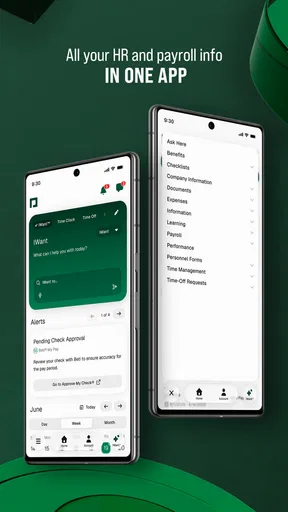
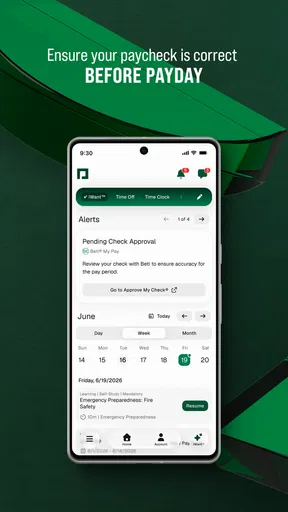
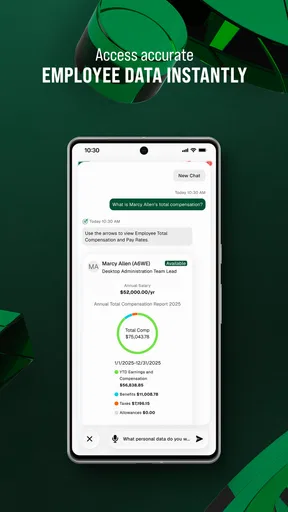
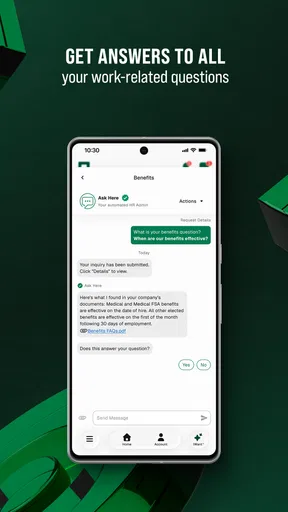
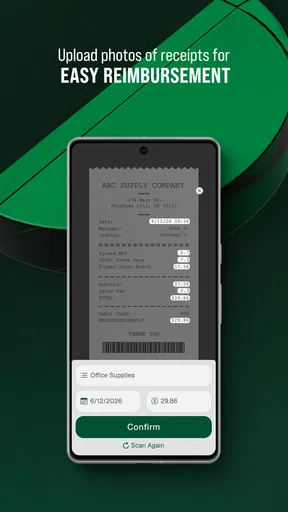
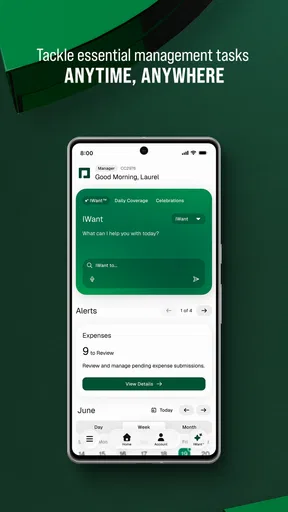
Paycom is a human capital management app designed to help employees and employers manage everyday workplace tasks. Depending on the organization’s setup, employees can use it to view pay information, access schedules, record time, request time off, review benefits, complete onboarding tasks, and update personal details. Available features can differ significantly between companies and user roles.
Can I use Paycom without an employer account?
No. Paycom is generally provided through an employer that uses Paycom’s payroll or workforce management services. You usually need company-specific login credentials, an employee self-service account, or an invitation from your organization before the app can be used. Downloading the application alone does not create access to payroll or HR information, so contact your employer if you have trouble registering.
Is Paycom safe for viewing payroll and personal information?
Paycom is built to handle sensitive employment and payroll data, and access normally requires authentication through credentials, security verification, or controls configured by your employer. Even so, users should protect their password, avoid signing in on shared devices, keep the app updated, and use only official download sources. Never share verification codes or login details with another person.
What can employees do in the Paycom mobile app?
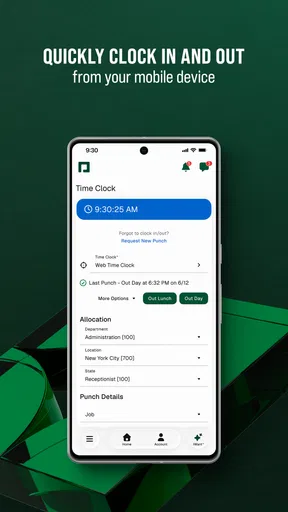
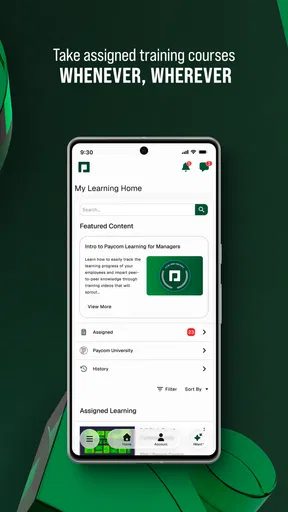
The exact tools depend on the services enabled by your employer, but the app may allow employees to review earnings statements, clock in or out, submit time-off requests, check schedules, complete assigned training, manage benefits, view tax documents, and communicate with HR. Some actions may require approval, and certain settings can only be changed through the web version or by an administrator.
What should I do if Paycom is not working or I cannot log in?
First, check your internet connection, update Paycom through the official app store, and confirm that you are entering the correct employer credentials. If the app displays an outage or synchronization problem, try again later. For forgotten passwords or locked accounts, use the available recovery option. If access still fails, your employer’s HR or payroll administrator is usually the correct support contact.


